


 Русский
  English (UK)
  العربية
  日本語
日本語  한국어
한국어  Magyar
  Türkçe
  Español
  Čeština
  Svenska
  Português
  Ελληνικά
  Suomi
Suomi  Nederlands
  Română
  Italiano
  Français
  Polski
  Українська
  Deutsch
  简体中文
简体中文  Slovenčina
 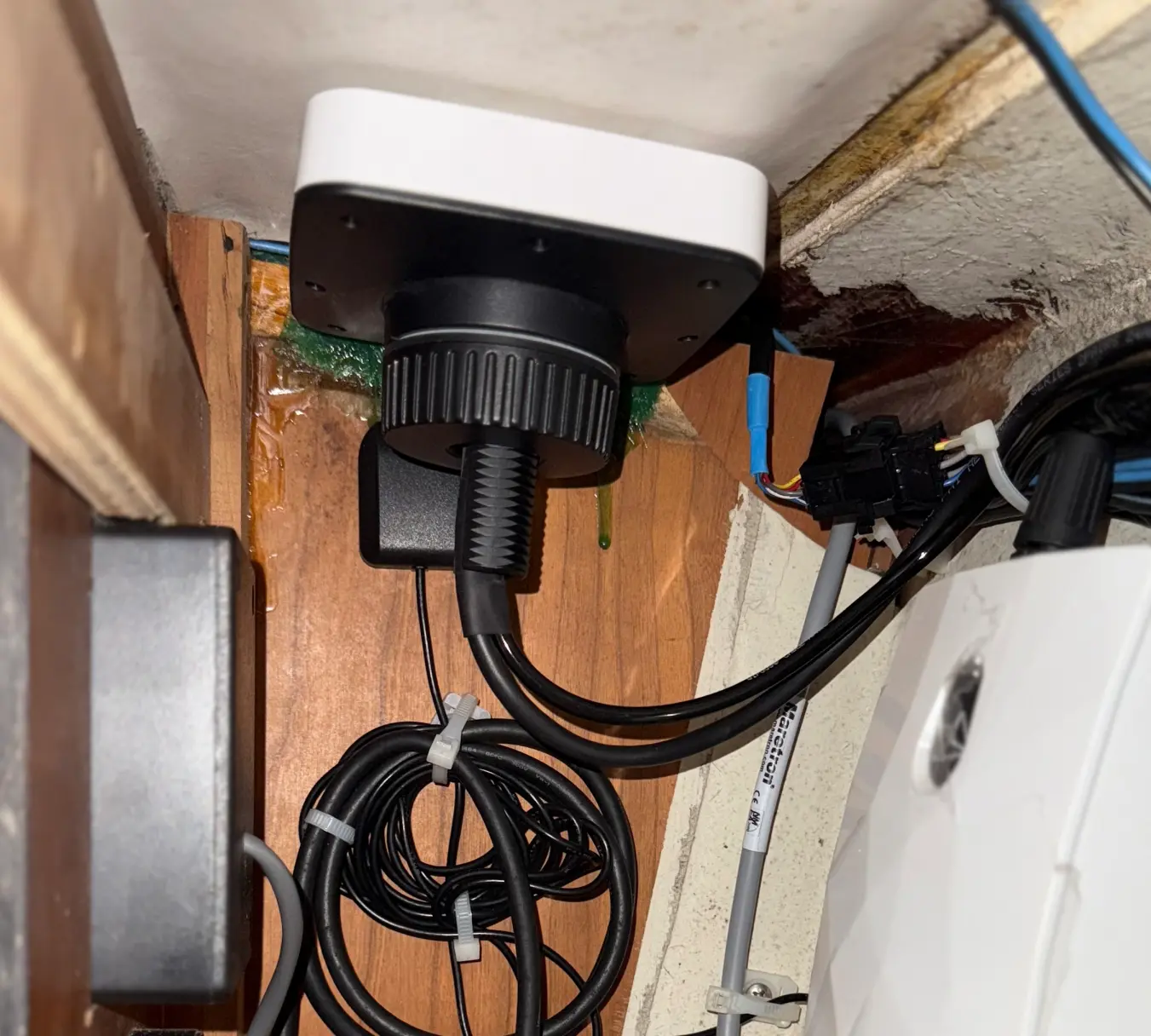 Orca Core Installation and Practical Setup Tips">

Orca Core requires a 12–24 V DC supply, a robust CAN/NMEA2000 backbone and considered antenna placement; these logistics determine how heading, GPS and wind data propagate across a vessel and how easily a marina-based service can commission multiple units for a rental fleet.
What the Core actually delivers on board
The Orca Core functions as a compact sensor hub: it integrates a high‑quality GPS, a fluxgate compass, and ports for external sensors while acting as a source for the Orca app and any NMEA networked displays. For most installations the Core eliminates the need for relying on tablet internal GPS units, offering greater accuracy and consistent position and heading data for charting and instrument displays.
Compatibility and hull materials
On aluminium boats the Core’s compass performs well; on steel yachts the fluxgate nature of the compass reduces utility because local magnetic distortion is significant. Mounting choices matter: a deck-mounted Core can improve GPS reception but may introduce magnetic interference for heading. Installers must balance these trade-offs when configuring charter or private vessels.
Networked sensors and source management
The Core supports selection of data sources rather than a formal priority/timeout queue. In practice you choose a primary source for heading, wind or speed; if that source disappears the Core will usually accept other available data but there is no documented, user-configurable priority failover similar to high-end race systems. For fleet managers this means clearly documenting expected sensor topologies for maintenance crews.
Calibration: why it matters and how Orca simplifies it
Sensors rarely output final, usable values without calibration. An anemometer gives pulses correlated to speed, a depth sounder produces an analog waveform, and a compass is affected by the boat’s magnetic history. Orca emphasizes automated and easy calibration routines so cruisers and small-crew charters can maintain reliable data without the deep expertise required by professional race processors.
- What gets calibrated: compass offsets, GPS alignment, wind sensor scaling and, optionally, boat polars if you use performance routing.
- Why frequent recalibration helps: changes in bottom fouling, sail condition, instrument drift and sensor replacements all alter the effective calibration history of a vessel.
- When to calibrate: after sensor replacement, rigging changes, or when instrument readings begin to diverge from known benchmarks.
Practical calibration tips
For non-racers, an automated Orca calibration covers most needs: follow the device prompts, perform straightforward maneuvers, and let the Core reconcile historic data. For very precise race-level performance, competitors still use advanced models and iterative tuning; those systems demand more manual work than Orca intends to require.
Installation checklist for a charter-ready vessel
| Item | Requirement | Notes for charter fleets |
|---|---|---|
| Power | 12–24 V DC, fused | Label circuits and keep spares for quick swap |
| Network | NMEA2000/CAN backbone | Ensure backbone terminators and accessible drops |
| Compass placement | Clear of ferrous masses | Avoid winches, power cables, and heavy metal fittings |
| GPS antenna | High, unobstructed view | Consider separate GPS mount if Core is below decks |
| App access | Wi‑Fi from Core | Limit user confusion: pin primary devices for charter guests |
Integration with displays and tablets
The Core’s internal GPS is more accurate than most tablet GPS units; owners can avoid provisioning tablets with SIM/GPS if they route data from the Core over Wi‑Fi. Note that direct access from non‑Orca apps may be limited; the Orca app is currently the primary client for consuming Core‑sourced information on a tablet.
Common questions from owners and fleet managers
Q: Will Core compute True Wind without a paddlewheel? A: True wind requires a reliable speed-through-water (STW) measurement for best accuracy; Orca encourages ultrasonic speed sensors for that reason. Without STW, systems that derive true wind from SOG suffer lower accuracy.
Q: Does Core provide source priority and automatic fallback? A: The Core allows you to select sources but doesn’t present a user-configurable priority queue like some high-end systems. It typically accepts alternate available inputs if the configured source disappears, but behavior for automatic recovery to a preferred source is not guaranteed.
Q: Can I skip an iPad with GPS and SIM if I use Core? A: Yes. The Core supplies better positioning and heading than typical tablet GPS; the Orca app then acts as the user interface. This can reduce hardware costs for charter operations and simplify device provisioning.
Tools and references for deeper calibration
For teams wanting to study advanced approaches, references such as “Mastering Data To Win” (Fernhurst Books) and community posts on forums like Sailing Anarchy offer in-depth perspectives on polars, calibration philosophy and race-level tuning; they also highlight the tedium of some legacy systems, notably the complexity associated with loading polars on devices like the B&G H5000.
Operational implications for sailing and boat rental
For rental operators and owners who value guest experience, Orca delivers a high share of usable performance with far less commissioning headache than legacy race-grade instrument suites. Less time spent tuning instruments means more time preparing vessels for charter, cleaner handovers, and predictable instrument behavior for guests who expect reliable route guidance and environmental readings.
GetBoat always keeps an eye on news related to sailing and seaside vacations, as we truly understand what it means to enjoy great leisure and love the ocean. The GetBoat service values freedom, energy, and the ability to choose your own course, and it places no limits on a good life, allowing clients to find a vessel that suits their preferences, budget, and taste.
Start planning your next seaside adventure and make sure to book the best boat and yacht rentals with GetBoat before the opportunity sails away! Provide a short forecast: this kind of consumer-friendly sensor hub is unlikely to shift the global tourism map drastically, but it reduces operational friction for charter operators and private owners, making reliable electronics more accessible across marinas and destinations.
Highlights: the Orca Core simplifies calibration, centralizes accurate GPS and heading, and reduces the need for separate tablet GPS units; it is particularly attractive for owners, charter operators and captains seeking a low‑maintenance, reliable instrument backbone. Experiencing a new location is always a multifaceted process, where one learns about the culture, nature, the indescribable palette of local colors, its rhythm of life and also the unique aspects of the service. If you are planning your next trip to the sea, you should definitely consider renting a boat (boat rentals, rent a boat, rent a yacht), as each inlet, bay, and lagoon is unique and tells you about the region just as much as the local cuisine, architecture, and language GetBoat.com
In summary: Orca Core is a compact, pragmatic sensor and network hub that prioritizes ease of calibration and reliable GPS/compass performance. For owners, captains and charter managers it reduces commissioning time and improves guest experience. The system’s limitations — fluxgate compass sensitivity to steel, and a lack of a user-exposed priority failover system — are straightforward to manage in typical leisure and rental deployments. Whether you are outfitting a dayboat, a cruising yacht or adding clarity to a superyacht’s leisure tender, the Orca Core helps deliver consistent navigation data that supports safer, more enjoyable boating. For booking, sale or charter planning across destinations, marinas and gulf coves, platforms like GetBoat.com provide transparent listings so you can choose a vessel that suits your sailing style, captain requirements and budget while enjoying activities from fishing to clearwater cruising on the sea, lake or ocean.